CodeCharge Studio 5.1
 |
|
||||||||||||||||||||


Accelerate Web Development with professional Web Application Generator
(create dynamic Websites like this one with minimal coding)
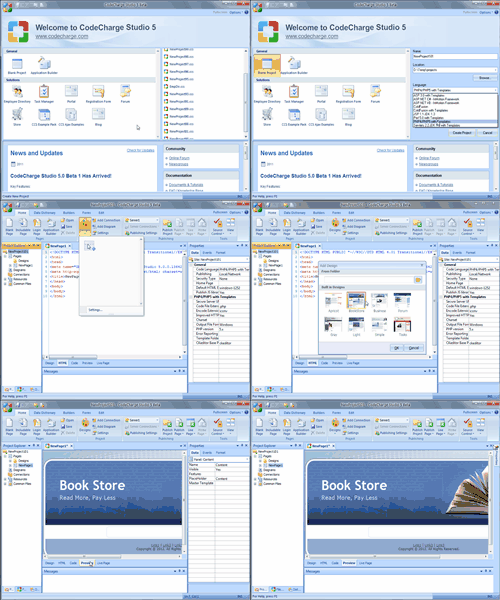
CodeCharge Studio is the leading and most productive solution for visually creating database-driven Web applications with minimal amount of coding. The support for virtually all databases, web servers and web technologies makes CodeCharge Studio one of a kind. It is a complete solution available for Web development.
Whether you are a legacy developer, MS Access programmer or experienced Web engineer, you can use CodeCharge Studio to rapidly develop anything from simple database-driven Web applications to complex e-business solutions.
The included Application Builder instantly converts your database (MS Access, MS SQL, MySQL, Oracle, etc.) into a working Web application with login-protected user access to database search, list, view and update functions.
CodeCharge Studio delivers the speed of code generation integrated with a full featured, powerful IDE. You can quickly generate dynamic, bug-free web sites in PHP, ASP, JSP, Perl, ColdFusion, ASP.NET. And then edit and customize your applications using the Studio's powerful code editors.
What's more, you can use any HTML editor to modify the HTML+CSS Website
designs created by CodeCharge Studio.
|
|
||
|
|
NEW IN VERSION 5
The new intuitive Ribbon GUI
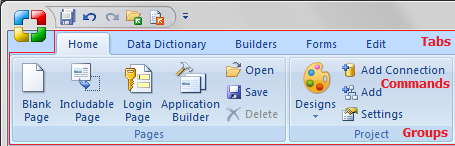
The Ribbon is designed to help you quickly find the commands that you need to complete a task. Commands are organized in logical groups, which are collected together under tabs. To reduce clutter, some tabs are shown only when needed. For example, the Table tab is shown only when a table is selected.
Data Dictionary and Database Explorer
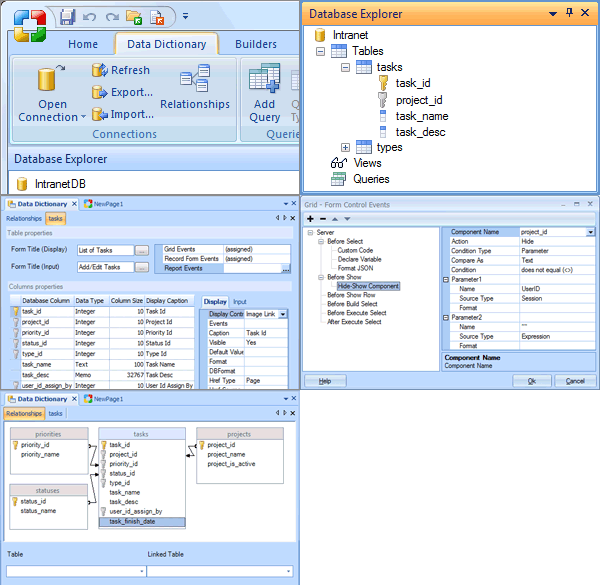
The Data Dictionary can be used to define properties of controls that are used by the form builders. In this way, you can reuse property settings and minimize the amount of customization that you apply to the forms created by the builders.
The Data Dictionary can also be used to view the database catalog, change properties of the forms generated, and also import or export data dictionaries you've defined.
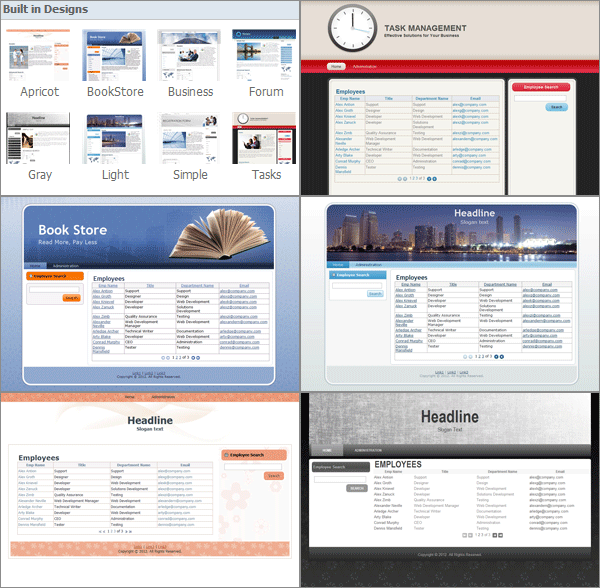
Built-in full-page design templates
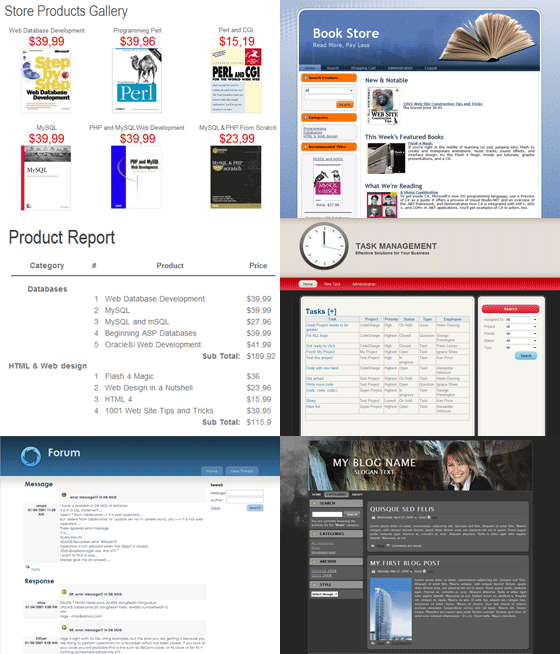
CodeCharge Studio is installed with a number of built-in designs you can use, but you can also create and add new designs templates with Artisteer.
Master/Detail Builder
The simplest and most convenient way of building froms for edit Master/Detail record is to use the Master/Detail Builder.
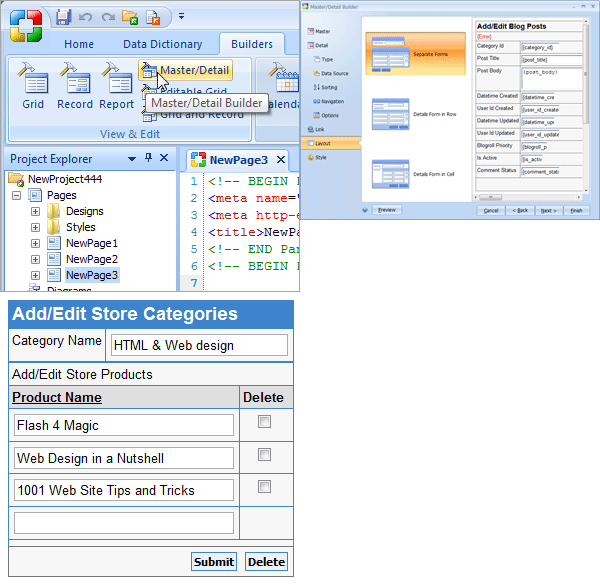
Form Builders
Fully redesigned and improved Builders. Previously added Forms now can be edited with Builders.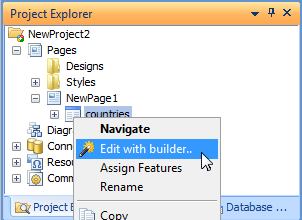
Master templates for Pages and Panels
Master pages allow you to create a consistent layout and styling for the pages in your application. Master pages are important because you can design the layout and formatting of various content sections in one page, then apply the same styling to separate content pages in your web project instead of designing each web page separately. When users request the content pages, the pages are merged with a master page to produce output that combines the layout of the master page with the content from the content page
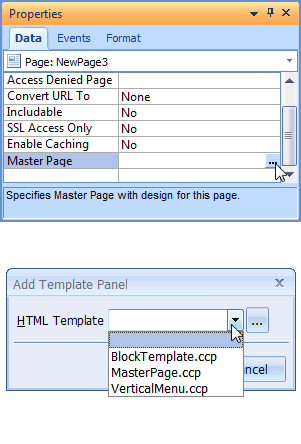
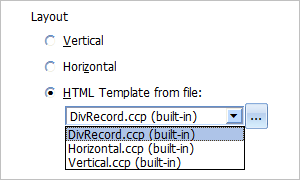
Custom HTML temlpates for builders
Builder output can be customized with user-defined HTML templates.
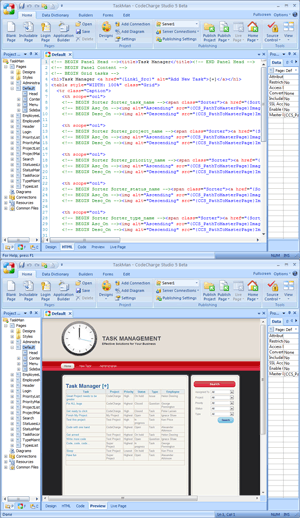
Preview Mode
Improved Preview Mode showing Include Pages, Translations, Master Pages, Live Data from Database, etc. without publishing to server.
New components
JScript Date Picker, Slider, Numeric Up Down, Interactive Search, Dialog Panel, etc..

Code Editor
Improved Code Editor: autocomplete, incremental search, match bracing, etc.
Sample Websites created using CodeCharge Studio
Here are only a few examples of Websites created using CodeCharge Studio:
- Dating Website: www.datemyfriend.net
- Online Store: www.babychime.com
- Web-based Calendar: www.sbuniv.edu/calendar/
- Corporate Website: www.yessoftware.com
- Web Forums/Discussions: forums.codecharge.com
- Informational/Product Website: www.ultraapps.com
- Community Website: www.jeepskiing.com
- Thousands of Corporate Sites and Intranet Portals
Click here to view Flash demo showing how easy it is to create your first Web application.
Companies using CodeCharge Studio
In addition to tens of thousands of individual Web developers and consultants, CodeCharge Studio is used at such respectable organizations as:- AT&T
- Bank One
- BF Goodrich
- Commerce Bank
- Commonwealth Bank Australia
- Countrywide
- Deutche Bank
- EDS
- Embarq/Sprint
- Federal Reserve Bank
- Home Savings Bank
- IBM
- Intel
- MCI
- Oracle
- Suntrust Bank
- US Army
- US Department of Defense
- US Department of Justice
- US Department of Veterans Affairs
- US Fish and Wildlife Service
- US House of Representatives
- US Navy
- Verizon
- Various city governments, schools, DMV departments, etc.
- Thousands more...
Technologies supported by CodeCharge Studio
- Web technologies: PHP, ASP.NET/C#, ASP.NET/VB, Perl, ColdFusion, Java Servlets, JSP.
- Databases: MySQL, MS SQL Server, MS Access, PostgreSQL, and all others that support Web connectivity.
- Web Servers: ALL Web servers are supported, including Apache, IIS, etc. on all platforms (Windows, Linux, Mac)
- CodeCharge Studio itself runs on Windows XP, 2000, 2003, Vista, 7, 2008, 2012, 8, 8.1
CODECHARGE STUDIO FEATURE OVERVIEW
Integrated Development Environment (IDE)
Integrated editors:
- Visual page designer: to design pages graphically.
- HTML editor: to edit your HTML & JavaScript with color syntax coding.
- Code editor: with auto-indent and color syntax coding.
- Page preview: for local viewing of templates.
- Live data viewer: for instantaneous viewing of pages with live data locally or on your server.
Project navigation:
- Project Explorer: provides a comprehensive view of all project pages, code, included files and media assets.
- Code Explorer: lists each object on the page and provides instant access to related code.
- Database Explorer: can be used to view the database catalog and select the tables and fields you want to configure in the data dictionary.
Precision controls:
Property inspector provides precise control over the properties of every page and page element:- Format: to set format and styles.
- Data: to control data sources and security.
- Events: to program events and insert custom actions.
Drag-and-drop objects:
Drag-and-drop objects allow you to visually create pages in the Designer that include:- HTML Elements: for all HTML tags and objects.
- Controls: to add data-aware labels, links and navigation.
- Components: to add sophisticated data-driven groups of integrated controls such as grids.
Integration with HTML editors:
CodeCharge Studio includes special integration features to work seamlessly with your favorite HTML editors.- Adobe® Dreamweaver®, Adobe® GoLive® and other HTML editors-Use virtually any program as your HTML editor in CodeCharge Studio. Set that program as your primary HTML editor CodeCharge will seamless use the program for HTML editing.
Language, Server and Database Support
- Languages: Supports ASP.NET 1.1 and 2.0+ (C# and VB.NET), ASP/VBScript, JSP, Java Servlets, ColdFusion, PHP 4, PHP 5, PHP 7 and Perl 5.
- Application servers: Supports industry-standard servers including Apache, Microsoft IIS, Adobe ColdFusion, IBM WebSphere, BEA WebLogic.
- Site publisher: publishes the project to the sever with a single click.
- Databases: Data Source wizard-speeds connectivity to virtually any database including: Microsoft SQL Server, Oracle, DB2, MySQL, and Microsoft Access. Supports access to multiple databases simultaneously. Visual query builder creates SQL queries without coding.
Productivity Features
Powerful wizards CodeCharge Studio's sophisticated component and application wizards automate the most common application interactions with a simple point-and-click interface:
- Application Wizard: creates a multi-page application supporting user queries and administrator updates based on your database structure.
- Component Wizards: generate sophisticated search, grid, login/logout, and record update components and pages automatically.
- Code generation: CodeCharge Studio generates your code on the fly using the CodeCharge code generation engine. The code is architected according to industry-wide best practices, easily extensible, and highly reliable. The engine automatically separates HTML pages from code logic, improving workflow and isolating changes to design, programming and deployment. Sites are faster to develop and easier to maintain because designers and programmers can focus on their respective responsibilities without affecting each other.
- Security management: CodeCharge Studio's integrated security management simplifies multi-level security.
- You define the privileges: Full, Read, Insert, Update or Delete-for each security group or user, and CodeCharge automatically includes the appropriate authentication code to link username and passwords to security level and privileges.
- Jumpstart solutions: CodeCharge Studio includes several pre-built and functional applications so you can see real CodeCharge-generated solutions in action. Copy and paste the code into your application or study how the experts did it.
- Customizable Styles: CodeCharge Studio includes many customizable styles using CSS or HTML tags so you can generate professionally designed Websites or support any corporate presentation standard.
For the list of main CodeCharge Studio features please visit http://www.yessoftware.com/products/features.php?product_id=1
Technologies supported by CodeCharge Studio
- Web technologies: PHP, ASP.NET/C#, ASP.NET/VB, Perl, ColdFusion, Java Servlets, JSP.
- Databases: MySQL, MS SQL Server, MS Access, PostgreSQL, and all others that support Web connectivity.
- Web Servers: ALL Web servers are supported, including Apache, IIS, etc. on all platforms (Windows, Linux, Mac)
- CodeCharge Studio itself runs on Windows XP, 2000, 2003, Vista, 7, 2008, 2012, 8, 8.1
Free Product Evaluation
Download Free 20-day TrialAnd if you have questions, go to YesSoftware Forums, the CodeCharge developer community site to get answers and pointers. Or go to http://support.yessoftware.com/ for the latest bulletins, product updates or to submit email support requests.